on · 3 min read
Devcontainer with Vault Managed Secrets
I’ve been experimenting with various Claude Code setups to build some guardrails around the agent. Several weeks ago, Trail of Bits released their Claude Code devcontainer and it is just chef’s kiss. The intent is for security audits and interacting with untrusted repositories, but I’ve been slowly working it into my workflow for all my agentic coding.
I wanted to improve secrets management with respect to loading secrets into the containers as they start. The beauty of the Trail of Bits setup is the post_install.py script that runs once you attach a folder to a devcontainer. It’s a clever hook that seamlessly puls in external configurations without cluttering the base image.
Vault
I was inspired by Wade Woolwine’s blog post, Make Your Homelab AI Agent Ready. There is a section on secrets management using HashiCorp Vault that really clicked for me.
There are a few secrets I need in my devcontainer to support my current workflows: SSH keys, GitHub tokens, and various project-dependent keys. I happen to have an HA deployment of Vault in my k3s cluster, so I decided to use AppRole for the secret exchange.
Vault AppRole is designed for machines and apps (not users). It requires a RoleID and a SecretID to exchange for a short-lived Vault token.
The Flow
I extended the aforementioned post_install.py to streamline this “Vault Handshake.” This is how the exchange happens:
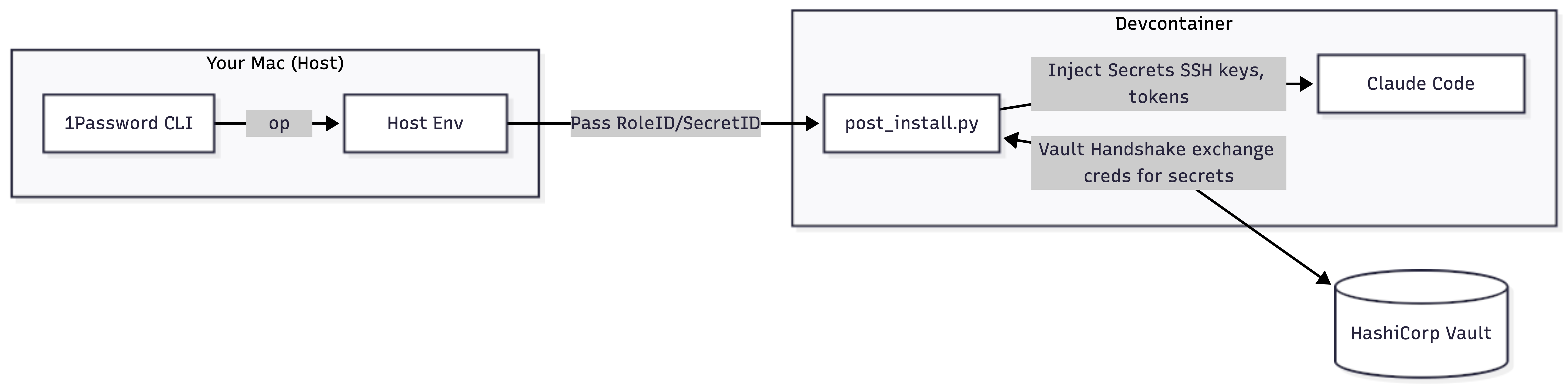
- The script takes
VAULT_ROLE_IDandVAULT_SECRET_IDfrom the host’s environment variables. - The two IDs are passed to the Vault API to get a temporary token (TTL is set very low).
- The script uses that token to fetch a private and public key from the KV secret store (at
secret/data/ssh/devcontainer). - The keys are written to
~/.sshand initialized. - The same flow pulls in GitHub tokens for the
ghCLI and any API keys needed for MCPs.
Setup
1. Enable AppRole & Define Policies
First, enable the AppRole backend and create granular policies. I split these up (SSH, MCP, GitHub) so I can reuse them elsewhere.
# Enable the Auth Backend
vault auth enable approle

# Create the Policies
# Note: Since I'm using KV V2, policies need the /data/ prefix
vault policy write devcontainer-ssh devcontainer-ssh.hcl
vault policy write devcontainer-mcp devcontainer-mcp.hcl
vault policy write github-token github-token.hcl
Example Policy (devcontainer-ssh.hcl):
path "secret/data/ssh/devcontainer" {
  capabilities = ["read"]
}
2. Configure the AppRole
I set the token_ttl to 5 minutes. That’s just enough time for the container to start, run the script, and get out.
vault write auth/approle/role/devcontainer \
    token_policies="devcontainer-ssh,devcontainer-mcp,github-token" \
    token_ttl=5m \
    token_max_ttl=10m \
    secret_id_ttl=0
3. Retrieve Your Credentials
You’ll need to pull the IDs to put them in your host environment so the devcontainer can see them. I prefer not to keep these in plain text in my .zshrc, so I use the 1Password CLI (op) to pull them on demand with a shell function:
load-vault() {
  export VAULT_ROLE_ID=$(op read "op://Personal/Vault-AppRole/role_id")
  export VAULT_SECRET_ID=$(op read "op://Personal/Vault-AppRole/secret_id")
  export VAULT_ADDR="https://vault.yourdomain.com"
  echo "Vault credentials loaded from 1Password."
}
To get those initial IDs for 1Password:
# Get the static RoleID
vault read -field=role_id auth/approle/role/devcontainer/role-id

# Generate the SecretID
vault write -f -field=secret_id auth/approle/role/devcontainer/secret-id
4. Populating the Secrets
Finally, store the actual keys into Vault.
# Store the SSH key pair
vault kv put secret/ssh/devcontainer \
    private_key=@~/.ssh/devcontainer_ed25519 \
    public_key=@~/.ssh/devcontainer_ed25519.pub

# Store MCP keys
vault kv put secret/mcp/ref api_key="sk-ref-..."
Summary
This is a bit over-engineered, but I wanted to learn something new to improve my agentic coding workflow. By combining Vault’s AppRole with the Trail of Bits post_install.py hook, I have a Claude Code environment that is provisioned with all the keys it needs.